
Sender Policy Framework is an email authentication standard that lets a domain publish which servers are allowed to send mail on its behalf. Receivers check a domain’s SPF record in DNS during the SMTP conversation to verify the envelope from identity (also known as the Return-Path). If the sending host matches what the domain has authorized, the receiver can treat the message as more trustworthy.
Formally documented by the IETF in RFC 7208 (which obsoletes RFC 4408), Sender Policy Framework operates at the Simple Mail Transfer Protocol layer, not the message content layer. The Internet Engineering Task Force and the IESG standardized SPF after industry experiments and proposals from early contributors including Meng Weng Wong, Paul Vixie, Dana Valerie Reese, Hadmut Danisch, and Gordon Fecyk. Related historical efforts included the MARID working group and Microsoft’s Sender ID, as well as concepts such as the Designated Mailer Protocol and Reverse MX.
In practice, SPF is a lightweight, DNS-based control that complements other controls (like DKIM and DMARC) to reduce forged email and improve deliverability. It is especially effective against spoofing of the SMTP path identities: the envelope from and the Return-Path.
Why SPF matters: deliverability, spoofing, and trust
SPF helps prevent email spoofing by letting domains declare which IPs and hosts may send on their behalf. That makes it harder for spammers to emit forged email that appears to be from your domain name and stage phishing campaigns. While no single control blocks all email spam, SPF gives spam filters and reputation systems a reliable signal tied to the Return-Path and HELO identity.
For brands and senders, a correct SPF record can:
- Improve inbox placement and reduce false positives, especially when combined with Whitelisting, DNS-based blackhole lists (DNSBL), and other controls.
- Mitigate backscatter by enabling receivers to reject during the SMTP transaction rather than sending a bounce message to a forged Return-Path.
- Strengthen compliance and trust by publishing a clear failure policy for unauthorized sources.
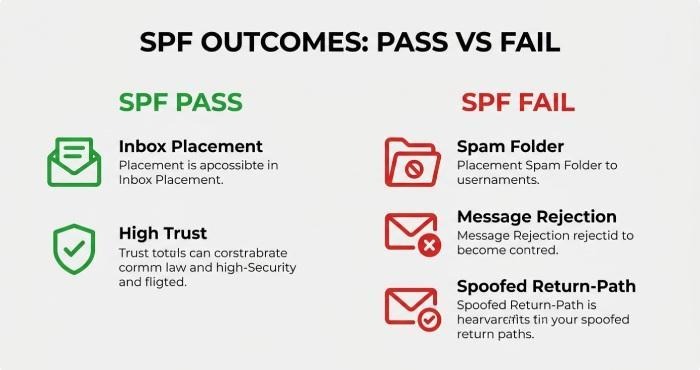
Put simply, when a receiving mail server’s message transfer agent (MTA) evaluates SPF, an SPF PASS outcome signals alignment with your policy publishing; SPF FAIL can trigger a rejection message or deprioritization.
How SPF works under the hood (DNS TXT record, mechanisms, qualifiers)
During an SMTP session (Simple Mail Transfer Protocol), the client connects to the server and presents a HELO/EHLO and then MAIL FROM. The MAIL FROM defines the envelope from identity that later becomes the Return-Path header. The receiving Mail transfer agent queries the Domain Name System for DNS records at the MAIL FROM domain and evaluates the domain’s SPF record, typically published as a TXT record resource record.
An SPF record starts with an SPF version tag (v=spf1) and then a sequence of mechanisms and qualifiers that define authorized sending hosts:
- Mechanisms: ip4, ip6, a, mx, include, exists, ptr (discouraged), and all.
- Qualifiers: + (PASS, implied), – (FAIL), ~ (SOFTFAIL), ? (NEUTRAL).
Common patterns:
- a and mx authorize the IPs returned by the domain’s A record and MX record.
- ip4 and ip6 directly list sending CIDRs.
- include imports another domain’s policy (for a cloud SMTP provider).
- all acts as the default catch‑all; often combined with -all for a deny list.
Receivers compute the first matching mechanism to produce a result such as SPF PASS, SPF FAIL, or a SOFTFAIL policy, and may also consider the HELO identity if the MAIL FROM is empty. Evaluation happens at the MTA level, not the visible From email address in the headers, which is why SPF alone cannot guarantee that the human-readable sender name was not forged.
Underneath, the DNS TXT record is just one of your DNS records; it’s read by the message transfer agent during delivery and does not affect web or other services. An email SPF record helps define which mail servers are authorized to send messages for your domain. Because each lookup can trigger additional DNS queries (for a, mx, include, exists), RFC 7208 enforces a limit of 10 DNS-mechanism lookups to keep processing bounded.
Step-by-step: creating and publishing an SPF record for your domain
Follow these steps to safely publish SPF for your internet domain:
1) Inventory your mail sources
List every email sender: your own outbound MTA, your marketing platform, CRM, ticketing system, and any remailing services. Confirm whether your MX hosts also send. Capture IP ranges and hostnames for all authorized sending hosts.
2) Choose mechanisms and your failure policy
- Direct IPs: use ip4/ip6.
- Host-derived: use a and mx only if those hosts actually send.
- Third parties: use include for providers.
- Catch‑all: choose -all for a strong deny list, or ~all for a softer posture during rollout (SOFTFAIL policy). This is your policy publishing and compliance stance.
3) Construct the SPF version string
Example: v=spf1 ip4:198.51.100.0/24 include:mail.example.net a mx -all This declares your SPF version (v=spf1), authorized sending hosts, and your failure policy. Keep the record under 255 characters per string; use standard DNS TXT concatenation if needed.
4) Publish the DNS resource record
Add a TXT record at the root of your domain name (example.com) or the specific subdomain used in the Return-Path. This DNS record is separate from your A record and MX record entries. Ensure the TTL aligns with how fast you may need changes to propagate.
5) Validate and test
Use dig or nslookup to fetch the TXT record and online analyzers (for example, dmarcian) to simulate an SMTP check. Send test messages and confirm receivers see SPF PASS. Monitor logs on your server and with providers’ tools.
6) Maintain and review
When you add or remove services, update the record promptly. Treat the SPF record as a living policy; keep an allow list to track approved platforms and rotate keys/hosts as vendors change infrastructure.
Note on forwarding and Mailing list behavior: classic mail forwarding and some mailing list processors can cause SPF FAIL because the forwarding server becomes the apparent sender. Forwarders should implement Sender Rewriting Scheme (SRS) to preserve authentication outcomes.
Common mistakes, limits, and how to troubleshoot failures
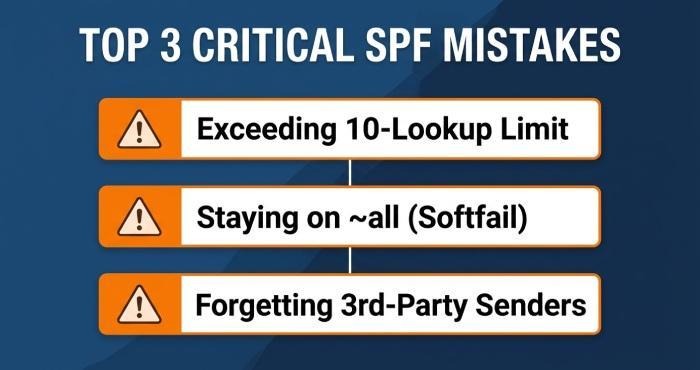
- Exceeding the 10-lookup limit: too many include, a, mx, or exists mechanisms can yield a permerror. Flatten includes judiciously or consolidate IP ranges.
- Using ptr or overbroad mx/a: prefer explicit ip4/ip6; ptr is discouraged by RFC 7208 and adds DNS lookups.
- Misplaced records: the SPF record must live where the Return-Path domain points, not necessarily the visible From domain.
- Assuming content protection: SPF authenticates the SMTP path identities, not the message body or display From email address.
- All set to ?all or ~all indefinitely: use SOFTFAIL only during migration. Mature policies typically end with -all to publish a clear deny list and reduce backscatter.
- Forgetting third-party senders: neglected vendors lead to SPF FAIL and a potential rejection message or silently reduced reputation.
Troubleshooting tips:
- Inspect the SMTP transcript to confirm the HELO identity and envelope from. Many MTAs log SPF results and the evaluated mechanism that matched.
- Verify DNS records with dig; ensure your TXT record is present and not split incorrectly. Remember each resource record string has size limits.
- Check for nested includes that push you past the lookup ceiling.
- For forwarding-induced failures, ask the intermediary to implement Sender Rewriting Scheme; without SRS, forwarded mail often fails, generating a bounce message if the receiver rejects.
- Use DNSBL signals and local allow list/deny list policies in concert with SPF to fine-tune acceptance. A balanced reputation system may weigh SPF PASS with historical sender behavior.
- Tools from providers and communities (e.g., dmarcian) help map dependencies and highlight compliance issues across your domain.
SPF vs DKIM vs DMARC: how they work together and what SPF can’t do
- SPF (Sender Policy Framework): DNS-published authorization of sending hosts validated during the Simple Mail Transfer Protocol session against the envelope from and Return-Path. It proves the path used by a permitted host but does not sign content or authenticate the visible From email address.
- DKIM: cryptographic signing of selected headers and body, allowing receivers to verify integrity and domain-level responsibility independent of the sending IP.
- DMARC: a policy layer that ties SPF and/or DKIM to the visible From domain with alignment rules and specifies a receiver action policy via a DNS TXT record at _dmarc.. It reports aggregate outcomes, enabling domain owners to enforce quarantine or reject.
What SPF can’t do:
- It cannot prevent display-name tricks, brand impersonation, or content tampering. It does not authenticate the From header—only the SMTP path identity.
- It can be broken by mail forwarding without SRS and by some mailing list transformations.
Historical note: MARID and Microsoft’s Sender ID attempted to blend path and header authentication, but the IETF standardized SPF in RFC 7208 as a distinct mechanism. Today, best practice is a combined deployment: publish an accurate SPF record, sign with DKIM, and enforce DMARC. Together, these DNS records give receivers stronger signals for spam filters, support better policy publishing, and improve overall deliverability across your internet domain.
