
What Is a DKIM Selector? Key Concepts and Terminology
What is DKIM selector. It is the label that tells a receiving system which domain key to use to validate a message’s DKIM signature. In DomainKeys Identified Mail, the sending platform signs specific email headers and message content with a cryptographic key pair. The public component is published in DNS records and the private component is held securely by the sender. The dkim selector bridges these components by pointing verifiers to the correct DNS location for the dkim public key that matches the dkim private key used to sign.
The signature is carried in the DKIM-Signature header (often mistyped as dkim-siganture header). That dkim-siganture header includes critical tags:
- d= tag: the signing domain.
- s= tag: the active selector.
- b= tag: the base64-encoded signature.
When a receiver validates the digital signature, it uses the selector to find the corresponding dkim public key at s._domainkey.d=. Because organizations may run multiple sending systems, each with its own cryptographic key pair, the dkim selector provides clean separation, safer key management, and operational flexibility without changing the base domain.
Key DKIM fields and tags
- DKIM-Signature header (aka dkim-siganture header in some logs) contains parameters that govern the verification process, including which email headers were signed and the canonicalization rules.
- d= tag names the domain taking responsibility for the message.
- s= tag identifies the selector, directing resolvers to the TXT record at selector._domainkey.domain.
- b= tag carries the computed digital signature produced using the dkim private key. A dkim selector therefore is not a key itself; it is an index that maps to a DNS-hosted public key, enabling receivers to re-compute and compare the signature for email authentication.
How DKIM Selectors Work: DNS Records, Signing, and Verification Flow
Proper use of a dkim selector depends on accurate DNS records, a secure signing process, and consistent verification by receivers across the Internet.
DNS publishing and records
For each dkim selector, you publish a dkim record at selector._domainkey.example.com as a TXT record. That record exposes the dkim public key (a public key in RSA format for most deployments) and policy flags. Many Email provider platforms, including Microsoft 365/Microsoft Exchange Online (Office 365) and Salesforce.com, provide provider instructions and may prefer CNAME records that alias to vendor-hosted TXT records. This cname record model simplifies key rotation and key delegation because the third-party provider can change the dkim key without your direct DNS edits.
Key points:
- Use 1024-bit or 2048-bit RSA dkim key pairs for stronger email integrity.
- Keep DNS records syntactically accurate; malformed TXT can break the verification process.
- Some organizations publish multiple selectors (for example, s1._domainkey and s2._domainkey) to support staged rotation or distinct mail streams.
Signing and verification flow
At send time, your mail server uses the dkim private key to compute the dkim signature over selected email headers (such as From, Subject, Date) and parts of the body, producing a digital signature stored in the DKIM-Signature header. The s= tag points to the active dkim selector, and the d= tag states the domain on behalf of which the message is signed.
On receipt, the email server or email client’s filtering stack fetches the dkim public key from DNS by querying the TXT record at selector._domainkey.domain. It then recomputes the expected signature from the transmitted content and headers and compares this to the b= tag value. If they match, the DKIM validation passes and the message benefits downstream in DMARC alignment and email delivery decisions by Gmail, Outlook, and other receivers.
Canonicalization and header choices
- Most senders use canonicalization relaxed/relaxed so minor whitespace or header folding differences do not break signatures.
- Sign the From header and other stable fields to preserve verification across typical mail flow, including forwarded emails and occasional email relay steps that may add benign headers.
Why DKIM Selectors Matter: Deliverability, Security, and Key Rotation
A robust dkim selector strategy directly influences email authentication outcomes, security posture, and operational agility.
- Deliverability and reputation: Receivers like Gmail and Outlook increasingly rely on DKIM plus DMARC for trust. A valid dkim signature anchored by a resolvable dkim selector improves email delivery and supports BIMI when DMARC alignment is enforced. Over time, consistent authentication enhances domain reputation and overall email integrity.
- Security and isolation: Mapping each sending platform to its own dkim selector and cryptographic key pair reduces blast radius. If one dkim private key is compromised, you can revoke that specific selector without affecting other services.
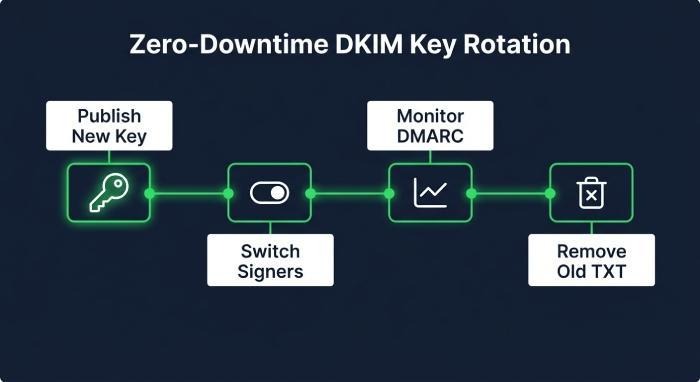
- Key rotation and lifecycle: Routine key rotation is a core part of key management. With multiple selectors, you can introduce a new key in parallel, update signers to the new selector, and retire the old key with minimal risk and no outage. The presence of a valid selector in DNS records is what allows seamless rollover.
Security, key management, and governance
Adopt a rotation cadence (for example, every 6–12 months), maintain an inventory of selectors per domain, enforce least-privilege access to dkim private key material, and ensure logs retain the active s= tag used for each message so incident response can pinpoint exposure windows. DMARC reporting (dmarc data) will confirm which selectors are actually observed at scale.
Setting Up and Managing DKIM Selectors: Naming, Multiple Selectors, and Rotation Strategy
Use human-readable, time-aware names such as 2026q1._domainkey.example.com or vendor1._domainkey.example.com. This makes audits and change windows clearer. In Microsoft 365, provider instructions typically generate two CNAME targets mapping to Microsoft’s hosted keys; follow those exactly and record which dkim selector each sending connector uses. For Salesforce.com or another third-party provider like exampleprovider.com, set up key delegation via a cname record from s1._domainkey.example.com to the provider’s DNS so they can rotate keys without waiting on your changes.
Naming and multiple selectors in practice
- Keep at least two active selectors to enable zero-downtime key rotation.
- Separate selectors by mail stream (marketing, transactional, support) or by platform to simplify troubleshooting.
- Document which systems use which dkim selector and where the corresponding dkim private key is stored.
- When rotating, publish the new dkim public key first, then switch signers to the new selector, monitor, and finally remove the old TXT once no longer observed in dmarc data.
Troubleshooting and Best Practices: Validation, Common Errors, and Monitoring
A disciplined approach to validation and monitoring ensures each dkim selector and dkim record works as intended and that the dkim signature is verifiable at major receivers.
Validation and monitoring toolkit
- dmarcian: Use DKIM Inspector and DKIM Validator to test selectors, parse the DKIM-Signature header, and confirm the d= tag, s= tag, and b= tag are coherent. dmarcian’s Delivery Center, Delivery Center Plus, Mailflow Monitoring, Bulk Lookups, and Managed Services help correlate dmarc data across providers. Their Forum, Blog, and API Reference are useful for deeper guidance.
- MXToolbox: The SuperTool (also referenced as supertool) provides DNS lookups for selector._domainkey records, checks TXT syntax, and can trace mail flow.
- Inbox-side checks: In gmail and outlook UIs, open the internet headers (“Show original” in Gmail or “View source” in Outlook) for header inspection. Confirm the DKIM-Signature header (sometimes shown as dkim-siganture header) is present, that the selector matches your DNS, and that From header alignment meets DMARC policy.
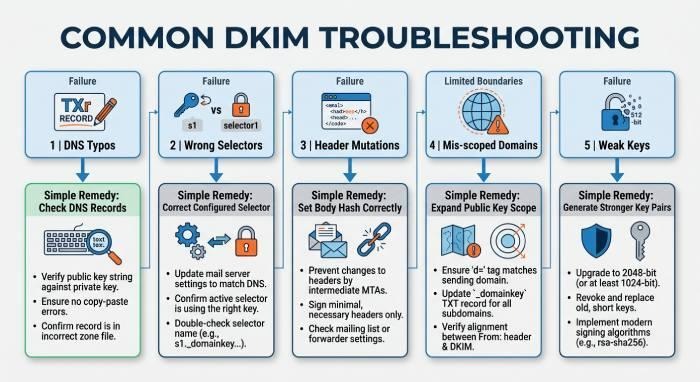
Common issues and remedies:
- DNS propagation or typos: If the TXT is missing or not syntactically accurate, receivers cannot fetch the dkim public key. Validate DNS on the Internet via MXToolbox and fix formatting or quoting.
- Wrong selector in production: If the signer uses s=old while only s=new is in DNS, signatures fail. Update the signer or restore the corresponding TXT until rotation is complete.
- Body or header mutations: Intermediate gateways, email relay systems, or security appliances that rewrite email headers or the body can break the b= tag check. Prefer relaxed/relaxed canonicalization and avoid signing unstable headers.
- Mis-scoped domain: The d= tag must reflect the domain intended for DMARC alignment. If the domain differs from the visible From header and your DMARC policy requires strict alignment, delivery may suffer.
- Weak or compromised keys: Replace small RSA keys and execute immediate key rotation if the dkim private key’s confidentiality is in doubt. Audit access and centralize key management.
- Third-party provider mismatches: When using key delegation with a cname record, ensure the provider has published the correct TXT and that your selector points to the right host per provider instructions.
